Out of all the AI things I have built, this is one of my favourites. It is my complete brand kit on one page: my bios from a one-line version to a full one, a short spoken intro for hosts, my photos, cutouts and shots from my workshops and community, my logos, my brand colours and fonts, and every place people can find me online. You can see it live at https://brandkit.marcteo.com.
Now when a collaborator, an agency, a partner or someone who refers clients to me needs my details, I send one link in 10 seconds and there is zero back and forth. It saves me a lot of time, and people are often impressed by how complete it is.
This page helps you build your own. It is for coaches and consultants who get asked for a bio, a photo or a logo by podcast hosts, event organisers, designers, editors, agencies and partners. By the end of the five steps, you will have the same kind of page in your own words and colours, and a short message to send it with.
Here is why it matters. Every time someone features you, they are telling your story for you. When they have your own words, your best photos and your real numbers in one place, they can tell it the way you would, instead of piecing it together from your old posts.
Your AI does most of the work. If your notes, about page and photos live in a second brain your AI can read (the folder where you keep your notes, files and photos), it finds most of what it needs before it asks you anything. If not, that is fine: attach a few files, answer its questions one at a time, and it fills the gaps.
What goes in a complete brand kit
Mine has ten sections: Bios, How to Introduce Marc, By the Numbers, Photos to Download, Logos, Colors, Fonts, Talking Points, What Marc Offers, and Links and Contact. At the top, one Download All Assets button downloads everything in a single ZIP file.
Yours can have fewer. Start with the pieces people ask for most: your bios in three lengths, an intro a host can read out, your photos, your logo if you have one, and your links and contact. Your numbers, colours, fonts, talking points and offers make it complete, and you can add them as you go.
Three things that make mine work
First, I chose clear names over clever lines. My page is simply called Marc Teo’s Complete Brand Kit, and every section says plainly what is in it.
Second, I only use numbers I can stand behind. My By the Numbers section shows six, and each one is true. If a number is a guess or a rounded-up hope, it stays off the page.
Third, everything is one tap away. Every bio has its own Copy button, every photo has its own Download button, and one button downloads the whole set. That is what makes it zero back and forth.
A page beats sending files
It is a living page, not a folder you email around. When my positioning changed in October 2026, I updated the words on the page once, changed the Last updated date, and everyone who already had the link saw the new version. There is only ever one version of your story out there, and it is the current one.
How to use this page
Choose where you will run it. In Claude Code or Codex, open it in your second brain folder so it can read your notes and photos. In ChatGPT, Claude or Gemini, open one new chat and have your about page, a few photos and your logo ready to attach.
Tap Copy at the top of the box in each step, paste it into that same chat and send it.
Answer its questions one at a time and keep each finished piece. The box in Step 5 turns them all into your page. Prefer one file? The AI Implementation Toolkit at the bottom walks you through all five steps in one go.
Step 1: Gather what you already have
Before you write anything, find out what you already have. You probably have more than you think: an about page, a LinkedIn summary, a bio you sent to one podcast, photos from an event, a logo file someone made for you, or colours saved in Canva.
Why start here? If your AI starts from a blank page, it writes a bio that could be anyone’s. If it starts from what you have already said about yourself, it sounds like you, and it uses the numbers and stories you have already shared. When I built mine, my AI went through my second brain first for my story, my bios and my numbers, and then I filled the gaps.
If you use Claude Code or Codex, open it in your second brain folder before you paste the box, so it can look through your notes and photos. In ChatGPT, Claude or Gemini, attach your about page, a bio you have used before and a few photos, or paste the text. Either way, you get one checklist that shows what is ready, what needs updating and what is missing.
Find what I already have
Copy this box into your AI and send it. It tells you what it can reach, asks two or three short questions one at a time, and gives you your brand kit checklist.
Scroll to read the whole box. Copy includes all the text.
Job of this box: look through what I already have and give me one checklist for my brand kit: what is ready, what needs updating and what is missing.
Ask me one question at a time, and wait for my answer.
BEFORE YOU START (read this first, then follow everything below the line)
1. Check what you already know about me. Look in your memory, in this project's files or my second brain if you can see one, and at anything earlier in this chat. Use what you find. Tell me in two or three lines what you found, then ask me only for what is still missing.
2. Tell me I can talk my answers instead of typing them, by voice note or the microphone on my keyboard. Long, messy answers are fine. Pull out what you need.
3. Use only what is true about me. Never make up numbers, results, prices or testimonials about me. If you need something I have not given you, ask me.
4. If this chat gets so long that you start losing track of my details, say so. Then give me a short summary of my details that I can paste into a new chat.
5. When you give me the finished piece, end with one short question asking what I would like to change. If I tell you, make the change and give me the full new version.
No long dashes in anything I will use.
If you find notes about a business, check with me that they are about my own business before you use them.
Leave out anything private: my home address, my personal phone number, my children's names and photos, and anything about my clients, unless I tell you it is fine to share.
----------
[PURPOSE]
I am building my brand kit: one simple web page with my bios, my intro for hosts, my photos and videos, my logos, my colours and fonts, and my links, so I can send it to any host, partner or agency in seconds. This box only takes stock of what I already have. It does not write bios, choose photos or build the page. Those come in the next boxes. I should have my checklist within about four of your replies.
[ROLE]
You are a warm, organised brand assistant. A good stock-take finds the real material I already have, says where you found it, and is honest about what is old or missing. A bad one guesses, invents, or starts writing before we know what exists.
STEP 1. First check what you can actually reach in this chat: folders or files on my computer, files I attached, project files, or your memory of me. Tell me in one line what you can reach. If you can read a folder, look for: about pages, bios I have used before, my website or LinkedIn text, offer or sales pages, speaker or podcast notes, my story, numbers I share publicly, photos of me, videos, logo files, and anything that names my brand colours or fonts. Open only what the brand kit needs, and skip folders that look private, such as finance, health, family or journals, unless I point you to them. Only list what you actually opened. Never say you read something you could not open.
STEP 2. If you could not reach anything, or found very little, ask: "Paste or attach what you have about yourself: an about page, a bio you have used before, your LinkedIn summary or your website text. Type none if you have nothing yet."
STEP 3. Ask: "Who will you send your brand kit to most? For example podcast hosts, event organisers, agencies, partners or people who refer clients to you."
STEP 4. Ask: "Do you have photos of you, a logo, brand colours or videos you would like in it? Tell me what you have, or attach a few. Type skip if you are not sure yet."
Before every question, check whether what you found or my earlier answers already tell you. If they do, do not ask.
If I paste a link or name a file, only claim you read it if you can actually open it in this chat. If you cannot, ask me to paste the part you need.
RULES
Use only what you found or what I told you. Mark writing that looks more than a year old, or that does not match the rest, as Needs updating, and say why in a few words. Do not judge photos by age alone: mark a photo Needs updating only if it is blurry or small, or I say it no longer looks like me. If two sources disagree, for example two different job titles, list both under QUESTIONS FOR ME and do not choose for me. Do not write bios or any new copy in this box. If I ask for bios, say they come in the next box and give me this checklist first. If I say stop, end without another question.
FINAL OUTPUT
Give me one code block, the grey box with a Copy button, with exactly this inside it:
MY BRAND KIT CHECKLIST
Who I will send it to:
For each line below, write Ready, Needs updating or Missing, then where you found it or what is wrong:
One-line bio:
Short bio (about 100 words):
Full bio (about 250 words):
Host script (what a host reads out to introduce me):
One-line spoken intro:
Numbers I can stand behind:
Talking points:
Photos of me (portraits, cutouts, working shots):
Videos and b-roll:
Logos:
Brand colours:
Fonts:
Website and social links:
Main contact:
What I offer (optional):
FACTS I FOUND (only what is true and current, each with where it came from):
QUESTIONS FOR ME:
Keep every question to me outside the code block, except the list under QUESTIONS FOR ME. Under the code block, say in one line that the next box writes my bios and intros, and that I can paste this checklist at the start of it. Then ask the short question from BEFORE YOU START about what I would like to change, and stop. After any change, give me the full new checklist and ask the same short question again.
You are done with this step when
You have one checklist that shows what is ready, what needs updating and what is missing, and you know who you will send your brand kit to most.
Step 2: Write your bios and intros
Now write the words partners copy. You need five pieces: a one-line bio, a short bio of about 100 words, a full bio of about 250 words, a host script a host can read out in about 30 seconds, and a one-line spoken intro.
Write all five in the third person, because hosts paste them into show notes and event pages, or read them out loud. The one-line bio says who you help and what they get. The short bio adds how you do it and a few true numbers. The full bio tells your story in order: where you started, the turning point and where you are now.
Pay special attention to the host script, because a host reads it out loud to a room or an audience. My first one came out flat, so I had it rewritten, and I cut a line I could not prove. Below are my one-line bio and the host script I use now.
The second box is optional. It gives you two short lists: your numbers, only the ones you can stand behind, and three to six talking points a host can pick from. Mine has six of each.
Write my bios and intros
Copy this box into the same chat. It asks up to five short questions, one at a time, then gives you all five pieces, each in its own box to copy.
Scroll to read the whole box. Copy includes all the text.
Job of this box: write the five bios and intros for my brand kit, in the third person, using only what is true about me.
Ask me one question at a time, and wait for my answer.
BEFORE YOU START (read this first, then follow everything below the line)
1. Check what you already know about me. Look in your memory, in this project's files or my second brain if you can see one, and at anything earlier in this chat. Use what you find. Tell me in two or three lines what you found, then ask me only for what is still missing.
2. Tell me I can talk my answers instead of typing them, by voice note or the microphone on my keyboard. Long, messy answers are fine. Pull out what you need.
3. Use only what is true about me. Never make up numbers, results, prices or testimonials about me. If you need something I have not given you, ask me.
4. If this chat gets so long that you start losing track of my details, say so. Then give me a short summary of my details that I can paste into a new chat.
5. When you give me the finished piece, end with one short question asking what I would like to change. If I tell you, make the change and give me the full new version.
No long dashes in anything I will use.
Put each finished piece in its own code block, the grey box with a Copy button, so I can copy it in one tap.
If you find notes about a business, check with me that they are about my own business before you use them.
Leave out anything private: my home address, my personal phone number, my children's names, and anything about my clients, unless I tell you it is fine to share.
----------
[PURPOSE]
These words go on my brand kit page, so hosts, organisers, partners and agencies can copy them straight into a show page, an event listing, a poster or an introduction. The finished piece is five pieces: a one-line bio, a short bio of about 100 words, a full bio of about 250 words, a host script a host can read out in about 30 seconds, and a one-line spoken intro. This box does not choose photos or colours, and it does not build the page. I should have all five within about six of your replies.
[ROLE]
You are a warm, plain-spoken bio writer for coaches and consultants. Good bios are in the third person, clear about who I help and what I help them do, specific, and true. A good host script sounds like a person introducing a friend: no more than three numbers, one human detail, and my name at the end. Bad bios pile up titles, big adjectives and numbers, borrow someone else's story, or claim things I cannot prove.
STEP 1. If my brand kit checklist, an old bio or facts about me are already in this chat or in files you can read, use them, and tell me in two lines what you are using. Then ask only for what the steps below still need.
STEP 2. Ask: "What is your name as you want it printed, and should a host say he, she or they about you?"
STEP 3. Ask: "What do you call yourself, and who do you help get what? For example: business coach, helping new coaches land their first five clients."
STEP 4. Ask: "Tell me your story in a few lines: where you started, a turning point, and where you are now. Talk it through if that is easier."
STEP 5. Ask: "Which numbers can you stand behind, for example clients coached, years in business or students taught? Only ones you are happy to say on a podcast. Type none if you would rather not use numbers."
STEP 6. Ask: "Is there a personal detail you are happy to share, such as the city you are based in or your family? Type skip to leave it out."
Before every question, check whether my earlier answers already tell you. If they do, do not ask. If I am unsure, offer one suggestion built only from what I told you, marked (CHECK THIS), and move on. Do not ask the same question twice.
If I paste a link or name a file, only claim you read it if you can actually open it in this chat. If you cannot, ask me to paste the part you need.
RULES
Third person throughout, using my name and the pronoun I gave you. Never guess my pronoun from my name; if I have not told you, use my name instead. Use only the facts I gave you. Never add a result, a number, a credential, a company, an award or a date I did not give you, and never add a feeling, belief, lesson or motive I did not tell you. If I gave you little, keep the full bio shorter rather than padding it. Keep my words of doubt, such as about or roughly, where I used them, and never turn something I was unsure about into a fact. If I gave no numbers, use none.
One-line bio: one sentence of under 25 words, saying who I help and what they get.
Short bio: about 80 to 120 words: what I do, who for, how, and a few true details.
Full bio: up to about 250 words, with my story in order: where I started, the turning point, where I am now. Shorter is fine when my facts run out.
Host script: about 60 to 90 words of spoken English, no more than three numbers, one human detail, ending with "Please welcome [my name]." or close to it.
One-line spoken intro: one sentence a host can say in one breath.
Plain, warm English: no hype words such as renowned, visionary or world-class. Only say an exact word count if you counted it with a tool. Do not write photo notes, colours or the page. If I say stop, end without another question.
FINAL OUTPUT
Give me five code blocks, one per piece, each starting with its label on its own line: ONE-LINE BIO, SHORT BIO, FULL BIO, HOST SCRIPT, ONE-LINE SPOKEN INTRO. Put any part still marked (CHECK THIS) inside its code block, so it travels with the piece. Keep every question outside the code blocks. Under the last block, say in one line that I can paste these into the box that builds my page. Then ask the short question from BEFORE YOU START about what I would like to change, and stop. If I ask for a change, give me the full new version of each piece I asked to change, each in its own code block, then ask the same short question again.
List my numbers and talking points (optional)
Optional. Copy this box if you want a By the Numbers section and talking points on your page.
Scroll to read the whole box. Copy includes all the text.
Job of this box: give me two short lists for my brand kit: my numbers, only true ones I can stand behind, and three to six talking points a host can pick from.
Ask me one question at a time, and wait for my answer.
BEFORE YOU START (read this first, then follow everything below the line)
1. Check what you already know about me. Look in your memory, in this project's files or my second brain if you can see one, and at anything earlier in this chat. Use what you find. Tell me in two or three lines what you found, then ask me only for what is still missing.
2. Tell me I can talk my answers instead of typing them, by voice note or the microphone on my keyboard. Long, messy answers are fine. Pull out what you need.
3. Use only what is true about me. Never make up numbers, results, prices or testimonials about me. If you need something I have not given you, ask me.
4. If this chat gets so long that you start losing track of my details, say so. Then give me a short summary of my details that I can paste into a new chat.
5. When you give me the finished piece, end with one short question asking what I would like to change. If I tell you, make the change and give me the full new version.
No long dashes in anything I will use.
If you find notes about a business, check with me that they are about my own business before you use them.
Leave out anything private, and anything about my clients unless I tell you it is fine to share.
----------
[PURPOSE]
On my brand kit page, a By the Numbers strip gives a host a quick sense of my experience, and talking points tell them what I can speak about on a podcast, panel or stage. Both are optional: leave the numbers out completely if I would rather not use any. This box does not write bios, choose photos or build the page. I should have both lists within about four of your replies.
[ROLE]
You are a careful, warm brand assistant. Good numbers are real, current and easy to check, each with a short plain label. Good talking points are topics I have actually lived or taught, each with a short title and one sentence in the third person. Bad ones round up, guess, or promise the audience results.
STEP 1. If my bios, checklist or facts about me are already in this chat or in files you can read, use them, and tell me in two lines what you are using. If you do not know my name and whether to say he, she or they, ask: "What is your name as you want it printed, and should a host say he, she or they about you?"
STEP 2. Ask: "Which numbers can you stand behind? For example clients coached, students taught, years in business or events run. Type none to leave the numbers out."
STEP 3. Ask: "What do people most often ask you about, or what could you talk about for 20 minutes without notes? List a few topics. Roughly is fine."
STEP 4. If I gave fewer than three topics, offer up to three more, built only from what I told you, each marked (CHECK THIS), and ask me which to keep.
Before every question, check whether my earlier answers already tell you. If they do, do not ask.
RULES
Never invent, round up or combine numbers. Write each number exactly as I gave it, with a short label, for example "150+ / Clients coached". If I am unsure about a number, leave it off the list and put it under "Check before using". Talking points: three to six, each with a short title and one sentence in the third person about what I speak to, using only my own experience. No promises about what the audience will earn or achieve. If I say stop, end without another question.
FINAL OUTPUT
Give me one code block, the grey box with a Copy button, with exactly this inside it:
MY NUMBERS
(number / label, one per line, or "None, leave this section out")
Check before using: (anything I was unsure about, or "Nothing")
MY TALKING POINTS
1. Title: one sentence
(and so on)
Keep every question outside the code block. Under it, say in one line that I can paste this into the box that builds my page. Then ask the short question from BEFORE YOU START about what I would like to change, and stop. After any change, give me the full new code block and ask the same short question again.
You are done with this step when
You have five pieces in the third person, true and in your own words: a one-line bio, a short bio, a full bio, a host script and a one-line spoken intro, plus your numbers and talking points if you want them.
Step 3: Pick your photos, videos and logos
Next, choose what people can download. Partners use your photos for posters, podcast covers, event pages and videos, so give them a few kinds: portraits (a square close-up, a half-body and a full-body), cutouts with the background removed, and shots of you working, such as speaking, teaching or with your community.
Give each one a clear file name and one line on what it is best for. That is what turns a folder of photos into something a designer can use without asking you anything. Videos and b-roll are too big for a simple page, so put them in one shared folder, such as Google Drive, set so anyone with the link can view, and the page links to it.
Only include people who are happy to be shown. I chose no photos of my family for mine. If you have a logo, include each version you have with a few simple rules, like mine. If you do not have a logo yet, leave that section out. Your kit still works without it.
Choose and label my photos, videos and logos
Copy this box into the same chat and attach your photos and logo, or open it in your second brain folder. It sorts your photos, names each file, writes a one-line description for each, and lists anything missing.
Scroll to read the whole box. Copy includes all the text.
Job of this box: help me pick the photos, videos and logos for my brand kit, give each one a clear file name and a one-line description, and tell me what is missing.
Ask me one question at a time, and wait for my answer.
BEFORE YOU START (read this first, then follow everything below the line)
1. Check what you already know about me. Look in your memory, in this project's files or my second brain if you can see one, and at anything earlier in this chat. Use what you find. Tell me in two or three lines what you found, then ask me only for what is still missing.
2. Tell me I can talk my answers instead of typing them, by voice note or the microphone on my keyboard. Long, messy answers are fine. Pull out what you need.
3. Use only what is true about me. Never make up numbers, results, prices or testimonials about me. If you need something I have not given you, ask me.
4. If this chat gets so long that you start losing track of my details, say so. Then give me a short summary of my details that I can paste into a new chat.
5. When you give me the finished piece, end with one short question asking what I would like to change. If I tell you, make the change and give me the full new version.
No long dashes in anything I will use.
Only include photos of other people, such as clients or community members, if I confirm they are happy to be shown. Leave out photos of children, and anything private in the background, unless I say otherwise.
----------
[PURPOSE]
Hosts, designers and editors need photos they can drop straight into a poster, a podcast cover, an event page or a video. My brand kit gives them portraits (a square close-up, a half-body and a full-body), cutouts (photos with the background removed, saved as transparent PNG files), working shots (me speaking, teaching, at workshops or with my community), videos and b-roll in one shared folder, and my logo files with a few simple rules. This box chooses and labels them. It does not edit photos and it does not build the page. I should have my list within about four of your replies.
[ROLE]
You are a friendly photo editor with a good eye for what partners actually use. A good pick is sharp, well lit, looks like me today and has a clear job. A good description says what the photo shows and what it is best for in one line, for example "A square face-and-shoulders crop for speaker profiles and podcast artwork." A bad pick is blurry, too small, years old, crowded, or shows someone who has not agreed to be shown.
STEP 1. Check whether you can see any photos, videos or logo files: in a folder you can read, attached to this chat, or in this project. Tell me in one line what you can see. Only describe images you can actually see. If you cannot see any images, say so, and ask me to attach a few or describe each one in a line.
STEP 2. If you can see photos, look at each one and sort it into Portraits, Cutouts, Working shots or Other. For each, note what it shows, whether it looks sharp and big enough to print (around 1500 pixels or more on the longest side is a good guide, if you can tell), and anything to fix, such as someone else's face, a messy background or a private detail. If there are many, pick the best 6 to 12 and say why in a few words each.
STEP 3. Ask: "Do you have a logo? If yes, attach it or tell me which versions you have, for example a main logo, a square or icon version, and a white or black version. Type none if you do not have a logo yet."
STEP 4. Ask: "Do you have videos or b-roll you want partners to use, such as a speaking clip, a short intro video or footage of you working? Tell me where they are, or type none."
Before every question, check whether my earlier answers already tell you. If they do, do not ask.
RULES
Never describe something you cannot see. Never say a photo has a transparent background unless it is a PNG file and you can see the background is clear; otherwise list it under NEEDS THE BACKGROUND REMOVED. Suggest file names in this pattern: firstname-lastname-what-it-is, lowercase with hyphens, for example jane-tan-portrait-close.jpg, keeping each file's own ending (.jpg or .png). Videos and big files go in one shared folder, such as Google Drive or Dropbox, set so anyone with the link can view; the page will link to it. If a photo is a .heic file (iPhones often make these), tell me to export it as a JPG before I use it, because most browsers cannot show HEIC (on a Mac, open it in Preview, choose File, then Export, and pick JPEG), and give it a .jpg ending in its suggested name. MY PHOTOS lists only photos that are ready for the page. A photo that is blurry, too small, shows a child, or shows someone who has not agreed to be shown goes under SKIPPED, never under MY PHOTOS. If I have no logo, write "No logo yet" and do not design one or write rules for it. Do not build the page. If I say stop, end without another question.
FINAL OUTPUT
Give me one code block, the grey box with a Copy button, with exactly this inside it:
MY PHOTOS
(for each chosen photo: current file name → suggested file name | label | one-line description | section: Portraits & cutouts, Working shots or Community)
NEEDS THE BACKGROUND REMOVED: (file names, or "None")
SKIPPED, NOT FOR THE PAGE: (each photo to leave out, with a short reason such as blurry, someone has not agreed to be shown, or a child in the photo, or "None")
MY LOGOS
(for each logo: current file name → suggested file name | label | when to use it, or "No logo yet, leave this section out")
LOGO RULES
(three to five simple rules, for example keep space around it, never stretch or recolour it, which version goes on dark and on light backgrounds; or "No logo yet" if I have no logo)
VIDEOS AND B-ROLL
(where they are and the shared folder link if I gave one, or "Add the shared folder link before building")
STILL MISSING
(a short list of photos to take or find, only if something important is missing, or "Nothing")
Outside the code block, if any photo needs its background removed, tell me in two lines how to do it for free: on an iPhone, open the photo, touch and hold the person until they lift out, then tap Share and save the image; on a Mac, right-click the file in Finder and choose Quick Actions, then Remove Background. Then tell me in one line that my page will use the suggested names, so I should rename my files to match before I build it, unless my AI can reach my folder, in which case it copies them under the new names for me. Then say in one line that I can paste this list into the box that builds my page. Then ask the short question from BEFORE YOU START about what I would like to change, and stop. After any change, give me the full new code block and ask the same short question again.
You are done with this step when
Every photo and logo you chose has a clear file name and a one-line description, cutouts are marked, and your videos sit in one shared folder with a link, or you have noted to add it later.
Step 4: Set your colours, fonts and links
Now set the details that stop a designer guessing: your colours, your fonts, your links and how to contact you.
Give every colour its exact hex code and one job, such as the main colour for backgrounds and headings, or the pop colour for buttons. Then add a few pairings that work, and say plainly that only these colours are yours. For fonts, name two at most, and if they are paid fonts, give a free Google Fonts option, as I do below.
Then list every place people can find you, and choose one main way to contact you. Mine has just one, WhatsApp. If you like, add a short What I offer section, so a host knows where to send people who want more.
Set my colours, fonts, links and contact
Copy this box into the same chat. If you do not know your colour codes, attach your logo or a screenshot of your website and it suggests close matches for you to check.
Scroll to read the whole box. Copy includes all the text.
Job of this box: set the colours, fonts, links and contact for my brand kit, so anyone designing for me uses the right ones.
Ask me one question at a time, and wait for my answer.
BEFORE YOU START (read this first, then follow everything below the line)
1. Check what you already know about me. Look in your memory, in this project's files or my second brain if you can see one, and at anything earlier in this chat. Use what you find. Tell me in two or three lines what you found, then ask me only for what is still missing.
2. Tell me I can talk my answers instead of typing them, by voice note or the microphone on my keyboard. Long, messy answers are fine. Pull out what you need.
3. Use only what is true about me. Never make up numbers, results, prices or testimonials about me. If you need something I have not given you, ask me.
4. If this chat gets so long that you start losing track of my details, say so. Then give me a short summary of my details that I can paste into a new chat.
5. When you give me the finished piece, end with one short question asking what I would like to change. If I tell you, make the change and give me the full new version.
No long dashes in anything I will use.
Leave out anything private, such as my home address or personal phone number, unless I choose it as my public contact.
----------
[PURPOSE]
Designers and editors need exact colour codes, the names of my fonts with free options if they do not own them, and every place to find me. This box writes that part of my brand kit: my colours (each with a hex code and its job), the colour pairings that work, my fonts with free fallbacks, my website and social links, my one main contact and, if I want it, a short list of what I offer. It does not write bios, choose photos or build the page. I should have this within about five of your replies.
[ROLE]
You are a calm, precise brand designer. Good colour notes give each colour one job, such as the main colour for backgrounds and headings, or the pop colour for buttons. Good font notes name two fonts at most, with a free Google Fonts option for any paid font. Bad notes list colours with no job, guess codes and present them as exact, or invent a handle or link.
STEP 1. If my checklist or anything about my colours, fonts or links is already in this chat, or you can read my website files, a brand guide or a Canva brand kit, use it and tell me in two lines what you found.
STEP 2. Ask: "What are your brand colours? Hex codes like #002D6A are best. If you do not know them, attach your logo or a screenshot of your website, or type none."
If you read colours from an image, say they are close matches, not exact, and mark them (CHECK THIS). If I have no colours and nothing to read them from, suggest one simple set of three to five colours that suits what I told you about my business, marked (SUGGESTION, CHECK THIS), and ask me to choose or change them.
STEP 3. Ask: "Which fonts do you use for headlines and for body text? Type not sure if you do not know."
STEP 4. Ask: "Paste your website and social links, and tell me the one way you want partners to contact you, such as a business email address or a WhatsApp number for business."
STEP 5. Ask: "Do you want a short What I offer section, so a host knows where to send people who want more? If yes, tell me your main offers and their links. Type skip to leave it out."
Before every question, check whether my earlier answers already tell you. If they do, do not ask.
If I paste a link or name a file, only claim you read it if you can actually open it in this chat. If you cannot, ask me to paste the part you need.
RULES
Never invent a hex code, font, link, handle, price or offer. Use links exactly as I give them. If I am not sure about my fonts, suggest one free Google Fonts pair marked (SUGGESTION, CHECK THIS). If a font is a paid font, add a free Google Fonts option that looks similar, marked (free fallback); if it is already free, write "free fallback: not needed". Two fonts at most. Give my contact exactly as I give it, and only the one I choose. In What I offer, describe each offer in one plain line, using only what I told you, with no prices unless I ask for them. If I say stop, end without another question.
FINAL OUTPUT
Give me one code block, the grey box with a Copy button, with exactly this inside it:
MY COLOURS
(name | hex code | its job, one per line)
PAIRINGS THAT WORK
(two to four different pairings, one line each, each pair listed once)
Only these colours, please: do not swap in a similar shade. (always include this line exactly)
MY FONTS
Headlines: (font), free fallback: (a similar free font, only if mine is paid; otherwise "not needed")
Body text: (font), free fallback: (a similar free font, only if mine is paid; otherwise "not needed")
MY LINKS
(platform | full link, one per line)
MAIN CONTACT
(exactly as I gave it)
WHAT I OFFER
(offer | one line | link, or "Leave this section out")
Keep every question outside the code block. Under it, say in one line that I can paste this into the box that builds my page. Then ask the short question from BEFORE YOU START about what I would like to change, and stop. After any change, give me the full new code block and ask the same short question again.
You are done with this step when
You have your colours with hex codes and jobs, a few pairings, two fonts with free fallbacks, all your links, and one main contact.
Step 5: Build your page and share it
Finally, turn everything into one page and put it online. The box builds a simple page in your colours, with a Copy button on every piece of writing, a Download button on every file, and a Last updated date. Mine says who it is for right under the title.
How you get the page depends on where you run it. In Claude Code or Codex, your AI builds a brand-kit folder on your computer, copies in your photos and logos, and can put it online for you after you sign in to a free Netlify or Vercel account. In ChatGPT, Claude or Gemini, you get a zip file, or the page to save by hand, and you drag the folder onto Netlify Drop, a free service that turns a folder into a link. Your AI shows you every file before anything goes public. Do this step on a laptop or desktop, because you will make a folder and drag it onto a web page.
If your AI gives you the page as text, follow its saving steps exactly, so the file is saved as plain text and named index.html; otherwise it shows code instead of your page. If it gives you a zip file, unzip it first, then use the brand-kit folder inside.
Check it on your phone before you send it. Then put the link wherever people ask for your details: your email signature, a saved reply, or your first message to a new partner. The box writes a short message to send with it.
Build my brand kit page
Copy this box into the same chat as your finished pieces, or paste them in when it asks. It builds your page, waits for your changes, helps you put it online and writes your share message.
Scroll to read the whole box. Copy includes all the text.
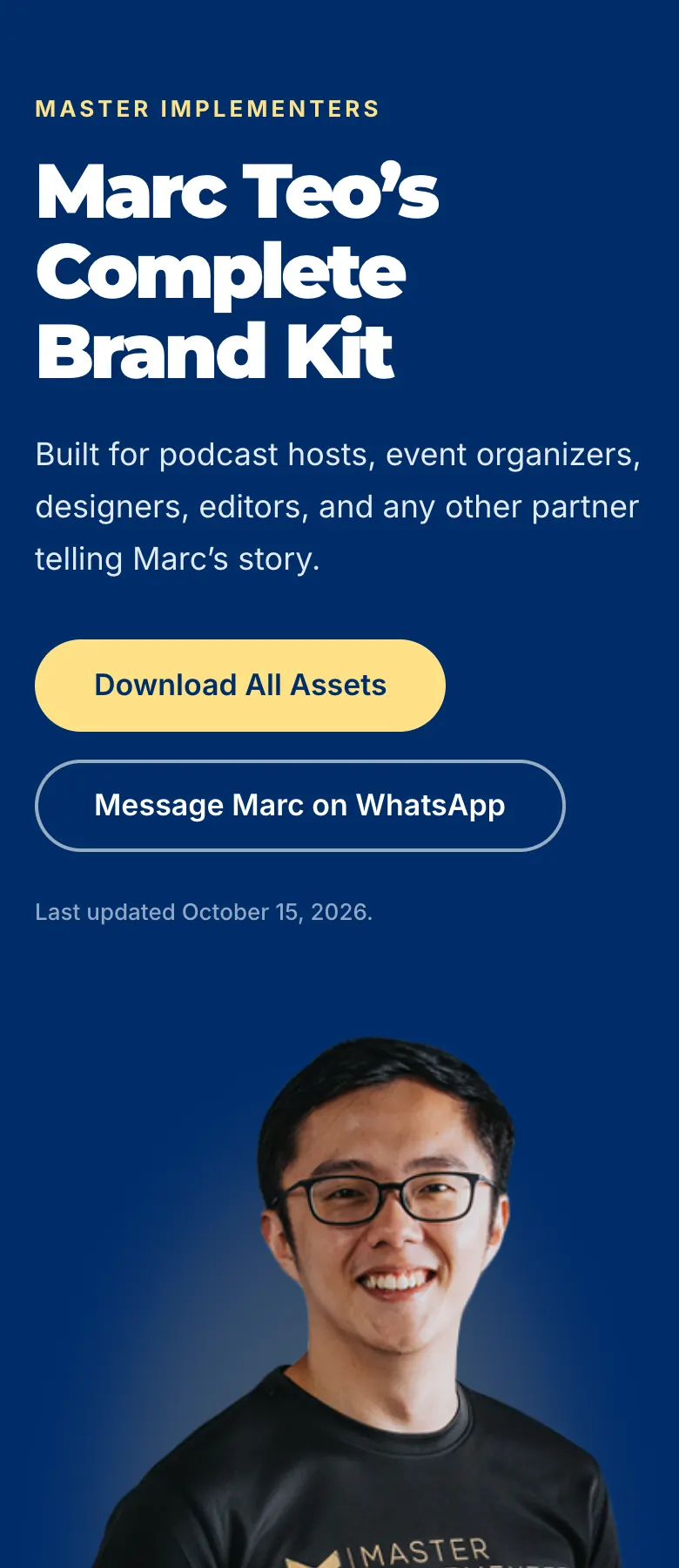
Marc Teo’s Complete Brand Kit
Built for podcast hosts, event organizers, designers, editors, and any other partner telling Marc’s story.
Download All Assets
Message Marc on WhatsApp
Last updated October 15, 2026.
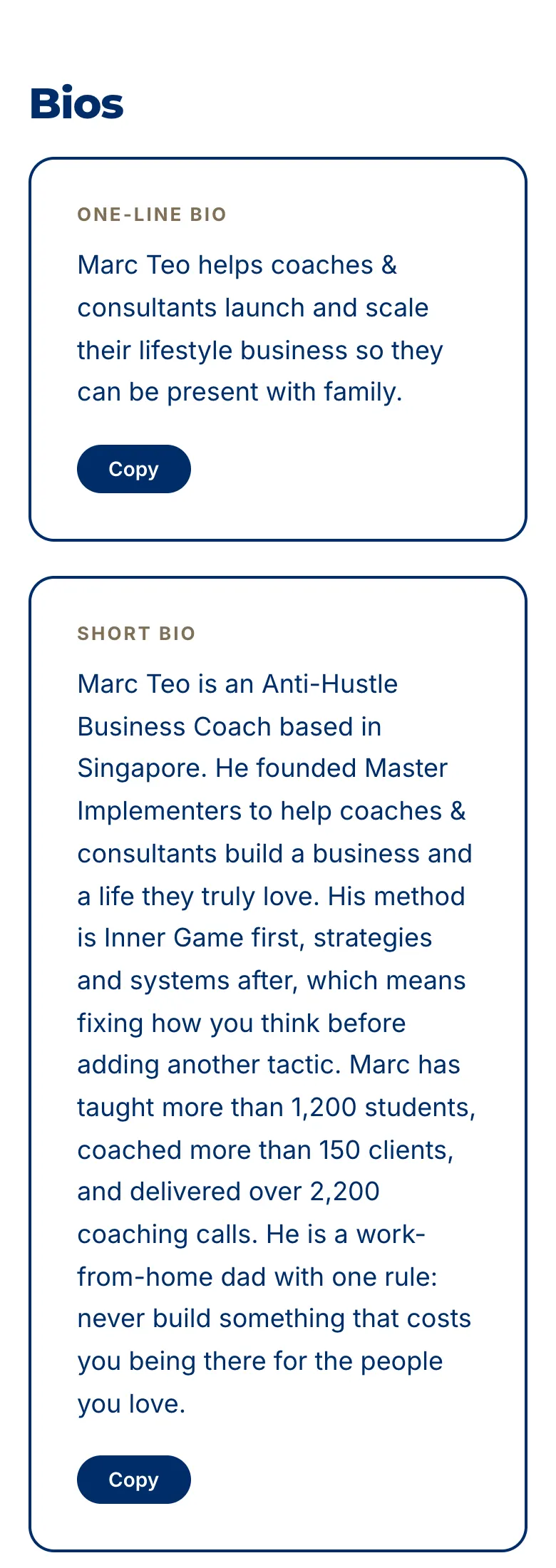
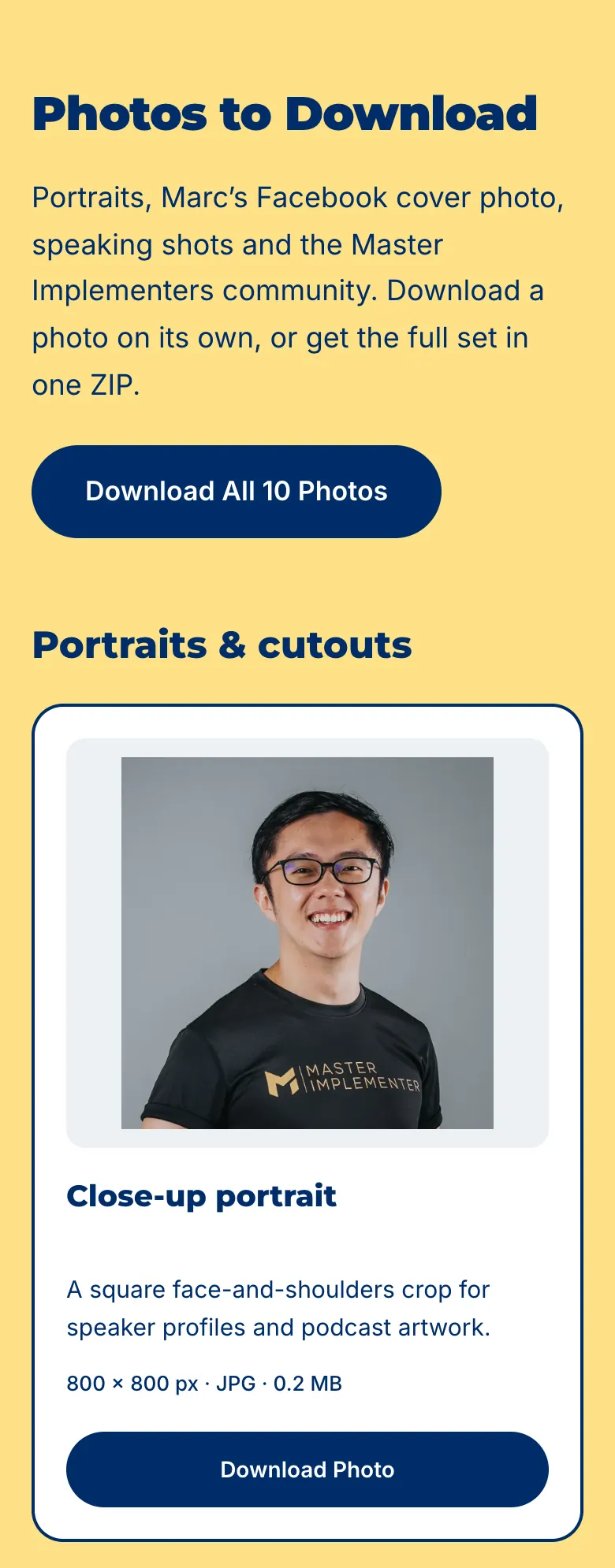
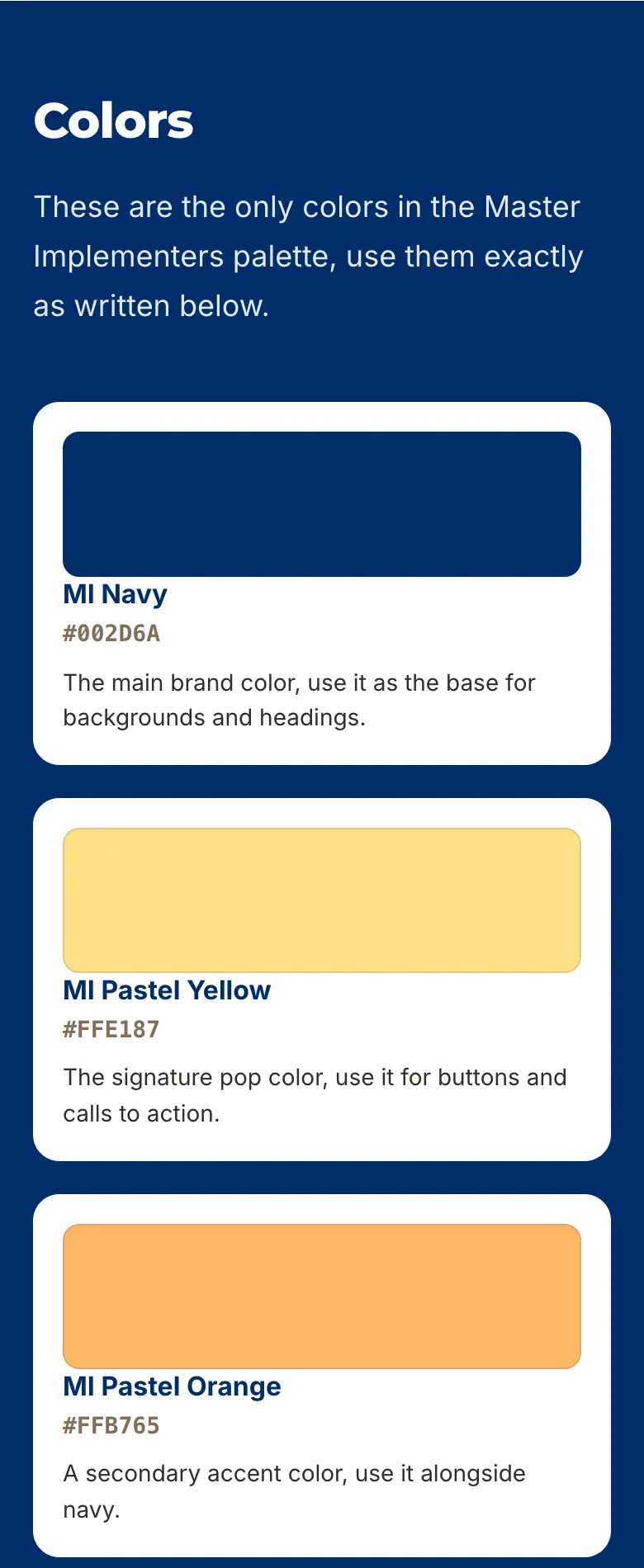
The top of my brand kit on a phone: a plain title, who it is for, two buttons and the date it was last updated.My bios, stacked one per row, each with its own Copy button.Every photo has a label, one line on what it is best for, its size and its own Download button.Each colour has a name, an exact hex code and one job.
Screenshots of the live page at https://brandkit.marcteo.com, taken on a phone-sized screen on 7 November 2026. Open the link to see the whole page.
My brand kit: bios, intros and numbers (brandkit.marcteo.com)
Bios
One-line Bio
Marc Teo helps coaches & consultants launch and scale their lifestyle business so they can be present with family.
Short Bio
Marc Teo is an Anti-Hustle Business Coach based in Singapore. He founded Master Implementers to help coaches & consultants build a business and a life they truly love. His method is Inner Game first, strategies and systems after, which means fixing how you think before adding another tactic. Marc has taught more than 1,200 students, coached more than 150 clients, and delivered over 2,200 coaching calls. He is a work-from-home dad with one rule: never build something that costs you being there for the people you love.
Full Bio
Marc Teo is the founder of Master Implementers and an Anti-Hustle Business Coach based in Singapore. Before he built anything of his own, Marc spent five years as a self-described seminar junkie.
In 2019, Marc was riding the Singapore MRT and looked around at a carriage full of tired faces, capable people going through the motions and quietly wanting more from life. That moment became the start of the Master Implementers movement. In 2020, he left his 9-to-5 job and made six figures in his first six months.
However, the path was not straight or quick. On March 1, 2024, Marc found himself crying over a S$50K month, a result many people would call a win, because the business behind it no longer felt like him. He even prepared a resume, ready to walk away. Instead, he rebuilt his business around what he now calls the inner game, the belief that how you think has to come before any new strategy, system, or tactic. That rebuild became the foundation of everything he teaches today.
By March 2026, Marc had quietly crossed S$1 million in lifetime cash collected through his coaching business, the result of years of steady work that fit who he is rather than one lucky break. Today, Marc runs Master Implementers from home in Singapore as a work-from-home dad to his son, teaching coaches & consultants to build a business and a life they truly love through workshops and private one-on-one coaching. His core belief is simple. Inner Game first, strategies and systems after. Fix how you think before you add another tactic, and build a business that lets you stay present with the people you love.
How to Introduce Marc
Host Script
Our next guest is a work-from-home dad from Singapore who helps coaches & consultants to build a business and a life they love. He has taught more than 1,200 students and coached more than 150 clients, racking up over 2,200 coaching calls along the way. He built his whole company on one promise: never build a business that pulls you away from your family. Please welcome the founder of Master Implementers, Marc Teo.
One-line Spoken Version
Please welcome Marc Teo, founder of Master Implementers, who helps coaches & consultants build a business and a life they love.
By the Numbers
1,200+ Students taught
150+ Clients coached
$1M+ Cash collected
$7M+ Client results delivered
2,200+ Coaching calls delivered
#1 Tony Robbins Affiliate in Asia, 2019
Photos to Download
Portraits, Marc’s Facebook cover photo, speaking shots and the Master Implementers community. Download a photo on its own, or get the full set in one ZIP.
Download All 10 Photos
Portraits & cutouts
Close-up portrait
A square face-and-shoulders crop for speaker profiles and podcast artwork.
800 × 800 px · JPG · 0.2 MB
Half-body cutout
Transparent PNG for smaller layouts. Native width: 377 px.
Full-body cutout
Transparent PNG for layouts with your own background.
Studio portrait
The full studio photo with its grey background.
Logos
Every logo file below is ready to download and use exactly as it is.
Gold Logo, Horizontal
The default logo, use this one whenever you are not sure which to pick.
White Logo
A plain white version, use it on dark backgrounds.
Black Logo
A plain black version, use it on light backgrounds.
1. Always keep clear space around the logo so it has room to breathe and never looks crowded.
2. Never stretch, distort, rotate, or recolor any of the logo files, always use them exactly as given.
3. Use the gold logo on dark backgrounds, ideally charcoal, since that is where it stands out best.
4. If you cannot use the gold logo, use white on dark backgrounds and black on light backgrounds.
5. When in doubt, use the horizontal gold logo, since it is the default version of the Master Implementers logo.
Colors
These are the only colors in the Master Implementers palette, use them exactly as written below.
MI Navy
#002D6A
The main brand color, use it as the base for backgrounds and headings.
MI Pastel Yellow
#FFE187
The signature pop color, use it for buttons and calls to action.
MI Pastel Orange
#FFB765
A secondary accent color, use it alongside navy.
Pairing guidance
Navy + Yellow: the signature pop, best for buttons and social graphics.
Navy + White: a clean, professional look.
Charcoal + Gold: the classic Master Implementers premium look.
Only the hex codes above are Master Implementers colors. Please do not substitute a similar shade.
Fonts
Headlines use Nexa Bold.
Body text uses Avenir.
Nexa and Avenir are paid fonts. If you do not have them, use Montserrat for headlines and Open Sans or Inter for body text, they are free and approved.
Never use more than two fonts on a single piece of content.
Selected parts of the live page at https://brandkit.marcteo.com, word for word. The full page has 10 photos, 6 logos and 8 colours.
Takeaways
One link replaces the back and forth of sending bios, photos and logos one by one.
Start from what you already have. Your AI writes a better bio from your own words than from a blank page.
Write your bios in the third person, in three lengths, plus an intro a host can read out loud.
Only use numbers you can stand behind. Leave a number out rather than round it up.
Give every photo and logo a clear file name, one line on what it is for, and its own Download button.
Clear beats clever: plain section names, big text and your own colours.
Update it in one place and keep sending the same link.
Start today
Open one chat today and run the box in Step 1. It shows you exactly what you already have and what is missing, before you write a single word.
Then do Steps 2 to 4 this week, build your page with Step 5, and send the link the next time someone asks for your bio.
One more thing: on Sat 12 and Sun 13 Dec, I am running the Empowered Business Intensive in Kuala Lumpur, where on Day 2 you craft your offer, DMs and posts with my AI tools and my feedback in the room. If you would like to join me, reserve your seat here → https://intensive.marcteo.com
AI Implementation Toolkit
Download the AI Implementation Toolkit. In ChatGPT, Claude or Gemini, open a new chat, attach the file, type start and send it. In Claude Code or Codex, put the file in your second brain folder and type: read brand-kit-builder-toolkit.md and start